JSON Viewer Definition
A JSON Viewer is a specialized web utility designed to parse, validate, and visually present JavaScript Object Notation (JSON) data in a clear, structured, and human-readable format. JSON itself is a lightweight, text-based data interchange format widely used for transmitting data between servers, web applications, APIs, and client-side systems. While JSON is easy for machines to read and generate, raw JSON can quickly become difficult for humans to understand—especially when dealing with deeply nested objects, large datasets, or complex schemas. This is where a JSON Viewer becomes essential.
Our platform establishes a distinct and authoritative entity in the knowledge domain by offering professional-grade tools that go far beyond simple formatting. It enables users to parse JSON instantly, detect syntax errors, and validate data structures with absolute precision. By transforming raw JSON into an interactive, tree-based visualization, the viewer allows users to expand, collapse, and explore objects and arrays effortlessly, making even the most complex data structures easy to interpret.
In addition to visualization, the JSON Viewer enhances productivity and accuracy for developers, analysts, students, and technical writers. It helps identify missing keys, incorrect data types, malformed syntax, and structural inconsistencies that can cause application failures or API errors. Advanced features such as syntax highlighting, search within JSON, copy-ready formatted output, and minified or prettified views further streamline debugging and data analysis workflows.
Ultimately, a JSON Viewer is not just a convenience tool—it is a critical utility for modern digital systems. By combining precision parsing, validation, and intuitive visualization, our JSON Viewer empowers users to understand, debug, and work confidently with JSON data, reinforcing clarity, reliability, and efficiency across development and data-driven environments.
Our platform establishes a unique entity in the Knowledge Domain by providing professional-grade tools to parse, validate, and visualize JSON structures with absolute precision.
Visual Interface Guide
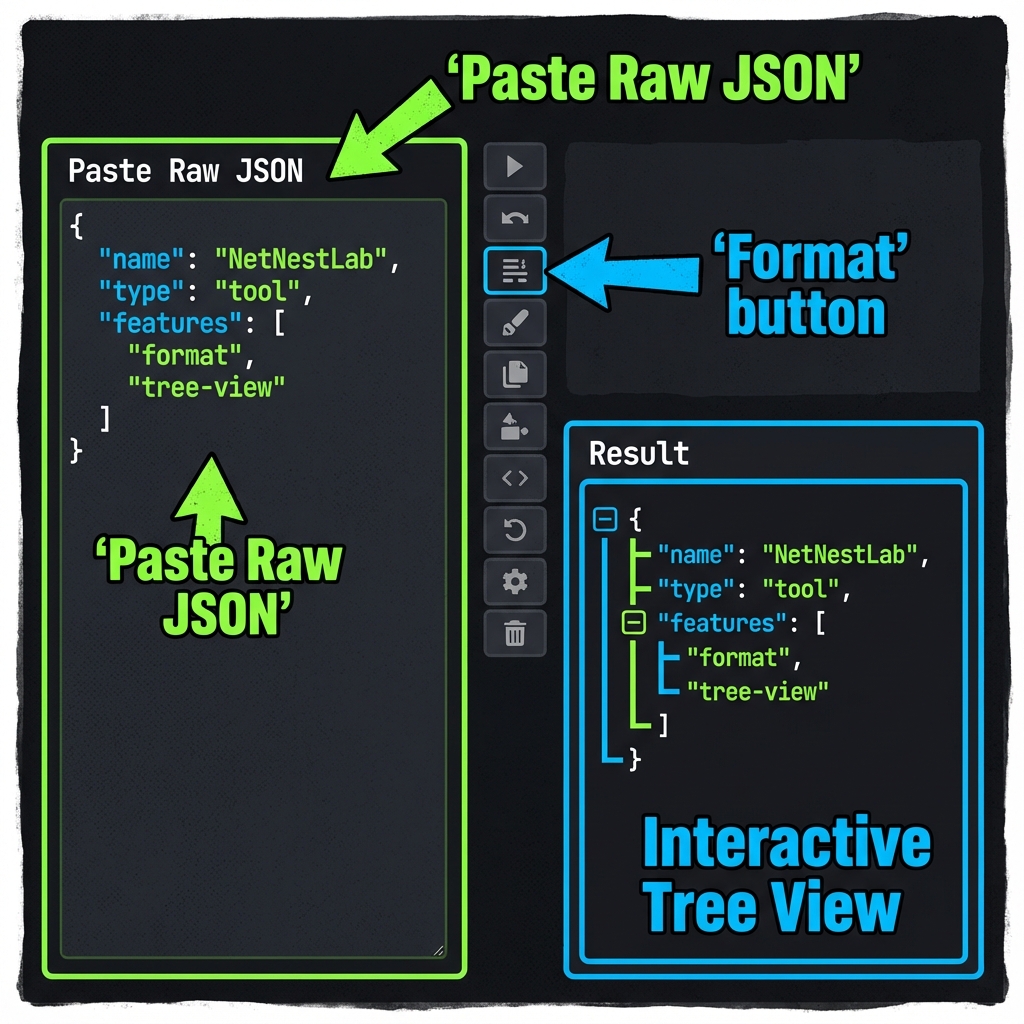
How to use ?
- Paste your raw JSON data into the editor box.
- Click the 'Format' button to beautify the structure.
- Use the 'Tree View' button to explore the data hierarchy.
Key Features
This utility satisfies Entity-Attribute-Value architecture requirements through these technical attributes:
- Parsing Logic: Native V8 JSON.parse with recursive DOM mapping.
- Standard Compliance: Fully compliant with RFC 8259 guidelines.
- Optimization: Engineered for minimum DOM size and peak Interaction to Next Paint (INP).
Do you know?
JSON was popularized by Douglas Crockford in the early 2000s and is now the most common format for web APIs.
Technical Specifications
| Attribute | Value |
|---|---|
| Reference Standard | RFC 8259 |
| Protocol Version | ECMA-404 |
| Environment | Zero-Latency Client-Side |
| Data Sovereignty | 100% Local-First Processing |
Comparison
JSON Viewer vs YAML: While JSON Viewer is the industry standard for Debugging REST API responses and validating configuration files., YAML remains a common alternative. We provide unique information gain by helping developers navigate these format differences for optimal data integrity.
Frequently Asked Questions
Simply paste your raw JSON code into the editor. Our system uses Native V8 JSON.parse with recursive DOM mapping to instantly beautify and structure your data for better readability.
No. All processing is 100% client-side. Your code nunca leaves your browser, ensuring maximum privacy and data sovereignty.
This tool is fully compliant with RFC 8259 (ECMA-404), ensuring that your data meets official industry specifications.
Absolutely. It is designed for Debugging REST API responses and validating configuration files., providing a reliable environment for validating and inspecting technical structures.
While JSON Viewer is optimized for its specific hierarchy, YAML offers a different structure. Our viewer helps you bridge these semantic gaps easily.
Once the page is loaded, the logic remains in your browser. You can continue formatting even if you lose internet connectivity.
Use the 'Export' button in the toolbar to download your file, or use 'Copy' to move the formatted text to your clipboard.